语法:
ruby-position : above | inline
参数:
above : 在基本文本上方定位ruby文本
inline : ruby文本与基本文本内联
说明:
设置或检索通过rt对象指定的注释文本或发音指南(参考ruby对象)的位置。
ruby对象及rt对象请参阅我的其他著作。
对应的脚本特性为rubyPosition。请参阅我编写的其他书目。
示例:
ruby { ruby-position: above; }ruby-position 指定注意的位置时使用。
属性值
1.before 注音文本会在基础文字上面表示。(默认值)
2.after 注音文本会在基础文字下面表示。
3.right 注音文本会在基础文字右面表示。
实例代码
立即学习“前端免费学习笔记(深入)”;
<!DOCTYPE html PUBLIC "-//W3C//DTD XHTML 1.0 Transitional//EN" "http://www.w3.org/TR/xhtml1/DTD/xhtml1-transitional.dtd">
<html xmlns="http://www.w3.org/1999/xhtml">
<head>
<meta http-equiv="Content-Type" content="text/html; charset=utf-8" />
<title> ruby-position </title>
<style>
ruby.sample1 {ruby-position:before;}
ruby.sample2 {ruby-position:after;}
ruby.sample3 {ruby-position:right;}
</style>

</head>

<body>
<p><ruby class="sample1">新幹線<rt>しんかんせん</rt></ruby></p>
                    <div class="aritcle_card">
                        <a class="aritcle_card_img" href="/ai/1176">
                            <img src="https://img.php.cn/upload/ai_manual/001/431/639/68b7b00a91a23666.png" alt="AI Room Planner">
                        </a>
                        <div class="aritcle_card_info">
                            <a href="/ai/1176">AI Room Planner</a>
                            <p>AI 室内设计工具,免费为您的房间提供上百种设计方案</p>
                            <div class="">
                                <img src="/static/images/card_xiazai.png" alt="AI Room Planner">
                                <span>136</span>
                            </div>
                        </div>
                        <a href="/ai/1176" class="aritcle_card_btn">
                            <span>查看详情</span>
                            <img src="/static/images/cardxiayige-3.png" alt="AI Room Planner">
                        </a>
                    </div>

<p><ruby class="sample2">新干线<rt>xinganxian</rt></ruby></p>
<p><ruby class="sample3">高铁<rt>High-speed rail</rt></ruby></p>
</body>
</html>实例图
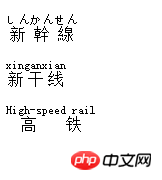
以上就是css中关于ruby-position属性的使用详解的详细内容,更多请关注php中文网其它相关文章!

每个人都需要一台速度更快、更稳定的 PC。随着时间的推移,垃圾文件、旧注册表数据和不必要的后台进程会占用资源并降低性能。幸运的是,许多工具可以让 Windows 保持平稳运行。

Copyright 2014-2025 https://www.php.cn/ All Rights Reserved | php.cn | 湘ICP备2023035733号


 643
643



 收藏
收藏