



简要教程
这是一款使用纯CSS3制作的时尚价格表。该价格表通过Bootstrap来进行布局,采用扁平风格,鼠标划过时还带有平滑过渡的颜色变化效果。
使用方法
HTML结构
该价格表的基本HTML结构如下:
CSS样式
完成该价格表的所有CSS代码如下:
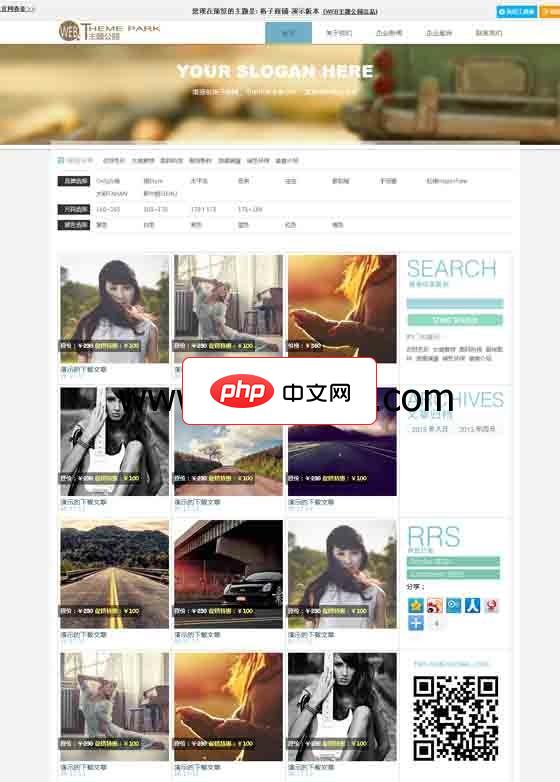
wordpress主题:格子商铺主题
下载
这是易秀购主题网转载的一款原创来至web主题公园的一款wordpress cms主题,非常适合做图片展示,或婚纱摄影类wordpress主题,采用了大气的网格化无缝设计,使列表以格子铺的方式排列,鼠标悬停的可以出现文章的简介。网站上方可以书写自己的广告语,图片也是可以替换掉的,图片会随着鼠标的移动而轻移,并且在鼠标滚动的时候,下面的模块会直接遮盖这个区域,这款wordpress cms主题视觉效果
.pricingTable{
      text-align: center;
  }
  .pricingTable .pricingTable-header{
      padding: 30px 0;
      background: #4d4d4d;
      position: relative;
      transition: all 0.3s ease 0s;
  }
  .pricingTable:hover .pricingTable-header{
      background: #09b2c6;
  }
  .pricingTable .pricingTable-header:before,
  .pricingTable .pricingTable-header:after{
      content: "";
      width: 16px;
      height: 16px;
      border-radius: 50%;
      border: 1px solid #d9d9d8;
      position: absolute;
      bottom: 12px;
  }
  .pricingTable .pricingTable-header:before{
      left: 40px;
  }
  .pricingTable .pricingTable-header:after{
      right: 40px;
  }
  .pricingTable .heading{
      font-size: 20px;
      color: #fff;
      text-transform: uppercase;
      letter-spacing: 2px;
      margin-top: 0;
  }
  .pricingTable .price-value{
      display: inline-block;
      position: relative;
      font-size: 55px;
      font-weight: bold;
      color: #09b1c5;
      transition: all 0.3s ease 0s;
  }
  .pricingTable:hover .price-value{
      color: #fff;
  }
  .pricingTable .currency{
      font-size: 30px;
      font-weight: bold;
      position: absolute;
      top: 6px;
      left: -19px;
  }
  .pricingTable .month{
      font-size: 16px;
      color: #fff;
      position: absolute;
      bottom: 15px;
      right: -30px;
      text-transform: uppercase;
  }
  .pricingTable .pricing-content{
      padding-top: 50px;
      background: #fff;
      position: relative;
  }
  .pricingTable .pricing-content:before,
  .pricingTable .pricing-content:after{
      content: "";
      width: 16px;
      height: 16px;
      border-radius: 50%;
      border: 1px solid #7c7c7c;
      position: absolute;
      top: 12px;
  }
  .pricingTable .pricing-content:before{
      left: 40px;
  }
  .pricingTable .pricing-content:after{
      right: 40px;
  }
  .pricingTable .pricing-content ul{
      padding: 0 20px;
      margin: 0;
      list-style: none;
  }
  .pricingTable .pricing-content ul:before,
  .pricingTable .pricing-content ul:after{
      content: "";
      width: 8px;
      height: 46px;
      border-radius: 3px;
      background: linear-gradient(to bottom,#818282 50%,#727373 50%);
      position: absolute;
      top: -22px;
      z-index: 1;
      box-shadow: 0 0 5px #707070;
      transition: all 0.3s ease 0s;
  }
  .pricingTable:hover .pricing-content ul:before,
  .pricingTable:hover .pricing-content ul:after{
      background: linear-gradient(to bottom, #40c4db 50%, #34bacc 50%);
  }
  .pricingTable .pricing-content ul:before{
      left: 44px;
  }
  .pricingTable .pricing-content ul:after{
      right: 44px;
  }
  .pricingTable .pricing-content ul li{
      font-size: 15px;
      font-weight: bold;
      color: #777473;
      padding: 10px 0;
      border-bottom: 1px solid #d9d9d8;
  }
  .pricingTable .pricing-content ul li:last-child{
      border-bottom: none;
  }
  .pricingTable .read{
      display: inline-block;
      font-size: 16px;
      color: #fff;
      text-transform: uppercase;
      background: #d9d9d8;
      padding: 8px 25px;
      margin: 30px 0;
      transition: all 0.3s ease 0s;
  }
  .pricingTable .read:hover{
      text-decoration: none;
  }
  .pricingTable:hover .read{
      background: #09b1c5;
  }
  @media screen and (max-width: 990px){
      .pricingTable{ margin-bottom: 25px; }
  }
以上就是纯CSS3时尚价格表设计效果的内容,更多相关内容请关注PHP中文网(www.php.cn)!
立即学习“前端免费学习笔记(深入)”;




