



在我们编程过程中如果需要执行一些简单的定时任务,无须做复杂的控制,我们可以考虑使用jdk中的timer定时任务来实现。下面lz就其原理、实例以及timer缺陷三个方面来解析java timer定时器。
一、简介
在java中一个完整定时任务需要由Timer、TimerTask两个类来配合完成。 API中是这样定义他们的,Timer:一种工具,线程用其安排以后在后台线程中执行的任务。可安排任务执行一次,或者定期重复执行。由TimerTask:Timer 安排为一次执行或重复执行的任务。我们可以这样理解Timer是一种定时器工具,用来在一个后台线程计划执行指定任务,而TimerTask一个抽象类,它的子类代表一个可以被Timer计划的任务。
Timer类
在工具类Timer中,提供了四个构造方法,每个构造方法都启动了计时器线程,同时Timer类可以保证多个线程可以共享单个Timer对象而无需进行外部同步,所以Timer类是线程安全的。但是由于每一个Timer对象对应的是单个后台线程,用于顺序执行所有的计时器任务,一般情况下我们的线程任务执行所消耗的时间应该非常短,但是由于特殊情况导致某个定时器任务执行的时间太长,那么他就会“独占”计时器的任务执行线程,其后的所有线程都必须等待它执行完,这就会延迟后续任务的执行,使这些任务堆积在一起,具体情况我们后面分析。
当程序初始化完成Timer后,定时任务就会按照我们设定的时间去执行,Timer提供了schedule方法,该方法有多中重载方式来适应不同的情况,如下:
schedule(TimerTask task, Date time):安排在指定的时间执行指定的任务。
schedule(TimerTask task, Date firstTime, long period) :安排指定的任务在指定的时间开始进行重复的固定延迟执行。
schedule(TimerTask task, long delay) :安排在指定延迟后执行指定的任务。
schedule(TimerTask task, long delay, long period) :安排指定的任务从指定的延迟后开始进行重复的固定延迟执行。
同时也重载了scheduleAtFixedRate方法,scheduleAtFixedRate方法与schedule相同,只不过他们的侧重点不同,区别后面分析。
scheduleAtFixedRate(TimerTask task, Date firstTime, long period):安排指定的任务在指定的时间开始进行重复的固定速率执行。
scheduleAtFixedRate(TimerTask task, long delay, long period):安排指定的任务在指定的延迟后开始进行重复的固定速率执行。
TimerTask
TimerTask类是一个抽象类,由Timer 安排为一次执行或重复执行的任务。它有一个抽象方法run()方法,该方法用于执行相应计时器任务要执行的操作。因此每一个具体的任务类都必须继承TimerTask,然后重写run()方法。
另外它还有两个非抽象的方法:
boolean cancel():取消此计时器任务。
long scheduledExecutionTime():返回此任务最近实际执行的安排执行时间。
二、实例
2.1、指定延迟时间执行定时任务
public class TimerTest01 {
 Timer timer;
 public TimerTest01(int time){
  timer = new Timer();
  timer.schedule(new TimerTaskTest01(), time * 1000);
 }

 public static void main(String[] args) {
  System.out.println("timer begin....");
  new TimerTest01(3);
 }
}

public class TimerTaskTest01 extends TimerTask{

 public void run() {
  System.out.println("Time's up!!!!");
 }
}
运行结果:
首先打印:
立即学习“Java免费学习笔记(深入)”;
timer begin....
3秒后打印:
Time's up!!!!
2.2、在指定时间执行定时任务
public class TimerTest02 {
 Timer timer;

 public TimerTest02(){
  Date time = getTime();
  System.out.println("指定时间time=" + time);
  timer = new Timer();
  timer.schedule(new TimerTaskTest02(), time);
 }

 public Date getTime(){
  Calendar calendar = Calendar.getInstance();
  calendar.set(Calendar.HOUR_OF_DAY, 11);
  calendar.set(Calendar.MINUTE, 39);
  calendar.set(Calendar.SECOND, 00);
  Date time = calendar.getTime();

  return time;
 }

 public static void main(String[] args) {
  new TimerTest02();
 }
}

public class TimerTaskTest02 extends TimerTask{

 @Override
 public void run() {
  System.out.println("指定时间执行线程任务...");
 }
}
当时间到达11:39:00时就会执行该线程任务,当然大于该时间也会执行!!执行结果为:
指定时间time=Tue Jun 10 11:39:00 CST 2014
指定时间执行线程任务...
2.3、在延迟指定时间后以指定的间隔时间循环执行定时任务
public class TimerTest03 {
 Timer timer;

 public TimerTest03(){
  timer = new Timer();
  timer.schedule(new TimerTaskTest03(), 1000, 2000);
 }

 public static void main(String[] args) {
  new TimerTest03();
 }
}

public class TimerTaskTest03 extends TimerTask{

 @Override
 public void run() {
  Date date = new Date(this.scheduledExecutionTime());
  System.out.println("本次执行该线程的时间为:" + date);
 }
}
运行结果:
本次执行该线程的时间为:Tue Jun 10 21:19:47 CST 2014
本次执行该线程的时间为:Tue Jun 10 21:19:49 CST 2014
本次执行该线程的时间为:Tue Jun 10 21:19:51 CST 2014
本次执行该线程的时间为:Tue Jun 10 21:19:53 CST 2014
本次执行该线程的时间为:Tue Jun 10 21:19:55 CST 2014
本次执行该线程的时间为:Tue Jun 10 21:19:57 CST 2014
.................
对于这个线程任务,如果我们不将该任务停止,他会一直运行下去。
对于上面三个实例,LZ只是简单的演示了一下,同时也没有讲解scheduleAtFixedRate方法的例子,其实该方法与schedule方法一样!
2.4、分析schedule和scheduleAtFixedRate
(1)schedule(TimerTask task, Date time)、schedule(TimerTask task, long delay)
对于这两个方法而言,如果指定的计划执行时间scheduledExecutionTime(2)schedule(TimerTask task, Date firstTime, long period)、schedule(TimerTask task, long delay, long period)
这两个方法与上面两个就有点儿不同的,前面提过Timer的计时器任务会因为前一个任务执行时间较长而延时。在这两个方法中,每一次执行的task的计划时间会随着前一个task的实际时间而发生改变,也就是scheduledExecutionTime(n+1)=realExecutionTime(n)+periodTime。也就是说如果第n个task由于某种情况导致这次的执行时间过程,最后导致systemCurrentTime>= scheduledExecutionTime(n+1),这是第n+1个task并不会因为到时了而执行,他会等待第n个task执行完之后再执行,那么这样势必会导致n+2个的执行实现scheduledExecutionTime放生改变即scheduledExecutionTime(n+2) = realExecutionTime(n+1)+periodTime。所以这两个方法更加注重保存间隔时间的稳定。
(3)scheduleAtFixedRate(TimerTask task, Date firstTime, long period)、scheduleAtFixedRate(TimerTask task, long delay, long period)
在前面也提过scheduleAtFixedRate与schedule方法的侧重点不同,schedule方法侧重保存间隔时间的稳定,而scheduleAtFixedRate方法更加侧重于保持执行频率的稳定。为什么这么说,原因如下。在schedule方法中会因为前一个任务的延迟而导致其后面的定时任务延时,而scheduleAtFixedRate方法则不会,如果第n个task执行时间过长导致systemCurrentTime>= scheduledExecutionTime(n+1),则不会做任何等待他会立即执行第n+1个task,所以scheduleAtFixedRate方法执行时间的计算方法不同于schedule,而是scheduledExecutionTime(n)=firstExecuteTime +n*periodTime,该计算方法永远保持不变。所以scheduleAtFixedRate更加侧重于保持执行频率的稳定。
三、Timer的缺陷
3.1、Timer的缺陷
Timer计时器可以定时(指定时间执行任务)、延迟(延迟5秒执行任务)、周期性地执行任务(每隔个1秒执行任务),但是,Timer存在一些缺陷。首先Timer对调度的支持是基于绝对时间的,而不是相对时间,所以它对系统时间的改变非常敏感。其次Timer线程是不会捕获异常的,如果TimerTask抛出的了未检查异常则会导致Timer线程终止,同时Timer也不会重新恢复线程的执行,他会错误的认为整个Timer线程都会取消。同时,已经被安排单尚未执行的TimerTask也不会再执行了,新的任务也不能被调度。故如果TimerTask抛出未检查的异常,Timer将会产生无法预料的行为。
(1)Timer管理时间延迟缺陷
前面Timer在执行定时任务时只会创建一个线程任务,如果存在多个线程,若其中某个线程因为某种原因而导致线程任务执行时间过长,超过了两个任务的间隔时间,会发生一些缺陷:
public class TimerTest04 {
 private Timer timer;
 public long start;

 public TimerTest04(){
  this.timer = new Timer();
  start = System.currentTimeMillis();
 }

 public void timerOne(){
  timer.schedule(new TimerTask() {
   public void run() {
    System.out.println("timerOne invoked ,the time:" + (System.currentTimeMillis() - start));
    try {
     Thread.sleep(4000); //线程休眠3000
    } catch (InterruptedException e) {
     e.printStackTrace();
    }
   }
  }, 1000);
 }

 public void timerTwo(){
  timer.schedule(new TimerTask() {
   public void run() {
    System.out.println("timerOne invoked ,the time:" + (System.currentTimeMillis() - start));
   }
  }, 3000);
 }

 public static void main(String[] args) throws Exception {
  TimerTest04 test = new TimerTest04();

  test.timerOne();
  test.timerTwo();
 }
}
按照我们正常思路,timerTwo应该是在3s后执行,其结果应该是:
timerOne invoked ,the time:1001
timerOne invoked ,the time:3001
但是事与愿违,timerOne由于sleep(4000),休眠了4S,同时Timer内部是一个线程,导致timeOne所需的时间超过了间隔时间,结果:

timerOne invoked ,the time:1000
timerOne invoked ,the time:5000
(2)Timer抛出异常缺陷
如果TimerTask抛出RuntimeException,Timer会终止所有任务的运行。如下:
public class TimerTest04 {
 private Timer timer;

 public TimerTest04(){
  this.timer = new Timer();
 }

 public void timerOne(){
  timer.schedule(new TimerTask() {
   public void run() {
    throw new RuntimeException();
   }
  }, 1000);
 }

 public void timerTwo(){
  timer.schedule(new TimerTask() {

   public void run() {
    System.out.println("我会不会执行呢??");
   }
  }, 1000);
 }

 public static void main(String[] args) {
  TimerTest04 test = new TimerTest04();
  test.timerOne();
  test.timerTwo();
 }
}
运行结果:timerOne抛出异常,导致timerTwo任务终止。
Exception in thread "Timer-0" java.lang.RuntimeException
 at com.chenssy.timer.TimerTest04$1.run(TimerTest04.java:25)
 at java.util.TimerThread.mainLoop(Timer.java:555)
 at java.util.TimerThread.run(Timer.java:505)
对于Timer的缺陷,我们可以考虑 ScheduledThreadPoolExecutor 来替代。Timer是基于绝对时间的,对系统时间比较敏感,而ScheduledThreadPoolExecutor 则是基于相对时间;Timer是内部是单一线程,而ScheduledThreadPoolExecutor内部是个线程池,所以可以支持多个任务并发执行。
3.2、用ScheduledExecutorService替代Timer
(1)解决问题一:
public class ScheduledExecutorTest {
 private ScheduledExecutorService scheduExec;

 public long start;

 ScheduledExecutorTest(){
  this.scheduExec = Executors.newScheduledThreadPool(2);
  this.start = System.currentTimeMillis();
 }

 public void timerOne(){
  scheduExec.schedule(new Runnable() {
   public void run() {
    System.out.println("timerOne,the time:" + (System.currentTimeMillis() - start));
    try {
     Thread.sleep(4000);
    } catch (InterruptedException e) {
     e.printStackTrace();
    }
   }
  },1000,TimeUnit.MILLISECONDS);
 }

 public void timerTwo(){
  scheduExec.schedule(new Runnable() {
   public void run() {
    System.out.println("timerTwo,the time:" + (System.currentTimeMillis() - start));
   }
  },2000,TimeUnit.MILLISECONDS);
 }

 public static void main(String[] args) {
  ScheduledExecutorTest test = new ScheduledExecutorTest();
  test.timerOne();
  test.timerTwo();
 }
}
运行结果:
timerOne,the time:1003
timerTwo,the time:2005
(2)解决问题二
public class ScheduledExecutorTest {
 private ScheduledExecutorService scheduExec;

 public long start;

 ScheduledExecutorTest(){
  this.scheduExec = Executors.newScheduledThreadPool(2);
  this.start = System.currentTimeMillis();
 }

 public void timerOne(){
  scheduExec.schedule(new Runnable() {
   public void run() {
    throw new RuntimeException();
   }
  },1000,TimeUnit.MILLISECONDS);
 }

 public void timerTwo(){
  scheduExec.scheduleAtFixedRate(new Runnable() {
   public void run() {
    System.out.println("timerTwo invoked .....");
   }
  },2000,500,TimeUnit.MILLISECONDS);
 }

 public static void main(String[] args) {
  ScheduledExecutorTest test = new ScheduledExecutorTest();
  test.timerOne();
  test.timerTwo();
 }
}
运行结果:
timerTwo invoked .....
timerTwo invoked .....
timerTwo invoked .....
timerTwo invoked .....
timerTwo invoked .....
timerTwo invoked .....
timerTwo invoked .....
timerTwo invoked .....
timerTwo invoked .....
........................
四、使用定时器实现弹弹球
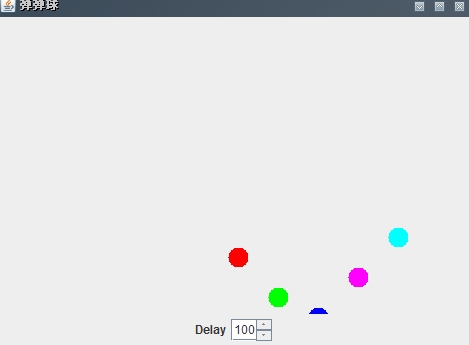
模拟书上的一个例题做了一个弹弹球,是在画布上的指定位置画多个圆,经过一段的延时后,在附近位置重新画。使球看起来是动,通过JSpinner组件调节延时,来控制弹弹球的移动速度.
BallsCanvas.java
public class BallsCanvas extends Canvas implements ActionListener,
  FocusListener {

 private Ball balls[]; // 多个球
 private Timer timer;

 private static class Ball {
  int x, y; // 坐标
  Color color; // 颜色
  boolean up, left; // 运动方向

  Ball(int x, int y, Color color) {
   this.x = x;
   this.y = y;
   this.color = color;
   up = left = false;
  }
 }

 public BallsCanvas(Color colors[], int delay) { // 初始化颜色、延时
  this.balls = new Ball[colors.length];
  for (int i = 0, x = 40; i < colors.length; i++, x += 40) {
   balls[i] = new Ball(x, x, colors[i]);
  }
  this.addFocusListener(this);
  timer = new Timer(delay, this); // 创建定时器对象,delay指定延时
  timer.start();

 }

 // 设置延时
 public void setDelay(int delay) {
  timer.setDelay(delay);
 }

 // 在canvas上面作画
 public void paint(Graphics g) {
  for (int i = 0; i < balls.length; i++) {
   g.setColor(balls[i].color); // 设置颜色
   balls[i].x = balls[i].left ? balls[i].x - 10 : balls[i].x + 10;
   if (balls[i].x < 0 || balls[i].x >= this.getWidth()) { // 到水平方向更改方向
    balls[i].left = !balls[i].left;
   }

   balls[i].y = balls[i].up ? balls[i].y - 10 : balls[i].y + 10;
   if (balls[i].y < 0 || balls[i].y >= this.getHeight()) { // 到垂直方向更改方向
    balls[i].up = !balls[i].up;
   }
   g.fillOval(balls[i].x, balls[i].y, 20, 20); // 画指定直径的圆
  }
 }

 // 定时器定时执行事件
 @Override
 public void actionPerformed(ActionEvent e) {
  repaint(); // 重画
 }

 // 获得焦点
 @Override
 public void focusGained(FocusEvent e) {
  timer.stop(); // 定时器停止

 }

 // 失去焦点
 @Override
 public void focusLost(FocusEvent e) {
  timer.restart(); // 定时器重启动

 }
}
BallsJFrame.java
class BallsJFrame extends JFrame implements ChangeListener {

  private BallsCanvas ball;
  private JSpinner spinner;

  public BallsJFrame() {
   super("弹弹球");
   this.setBounds(300, 200, 480, 360);
   this.setDefaultCloseOperation(EXIT_ON_CLOSE);
   Color colors[] = { Color.red, Color.green, Color.blue,
     Color.magenta, Color.cyan };
   ball = new BallsCanvas(colors, 100);
   this.getContentPane().add(ball);

   JPanel panel = new JPanel();
   this.getContentPane().add(panel, "South");
   panel.add(new JLabel("Delay"));
   spinner = new JSpinner();
   spinner.setValue(100);
   panel.add(spinner);
   spinner.addChangeListener(this);
   this.setVisible(true);
  }

  @Override
  public void stateChanged(ChangeEvent e) {
   // 修改JSpinner值时,单击JSpinner的Up或者down按钮时,或者在JSpinner中按Enter键
   ball.setDelay(Integer.parseInt("" + spinner.getValue()));

  }

 public static void main(String[] args) {
  new BallsJFrame();
 }

}
效果如下:
解析Java中的定时器及使用定时器制作弹弹球游戏的示例





