



获取微信openid
先获取code
再通过code获取authtoken,从authtoken中取出openid给前台
微信端一定不要忘记设定网页账号中的授权回调页面域名
流程图如下
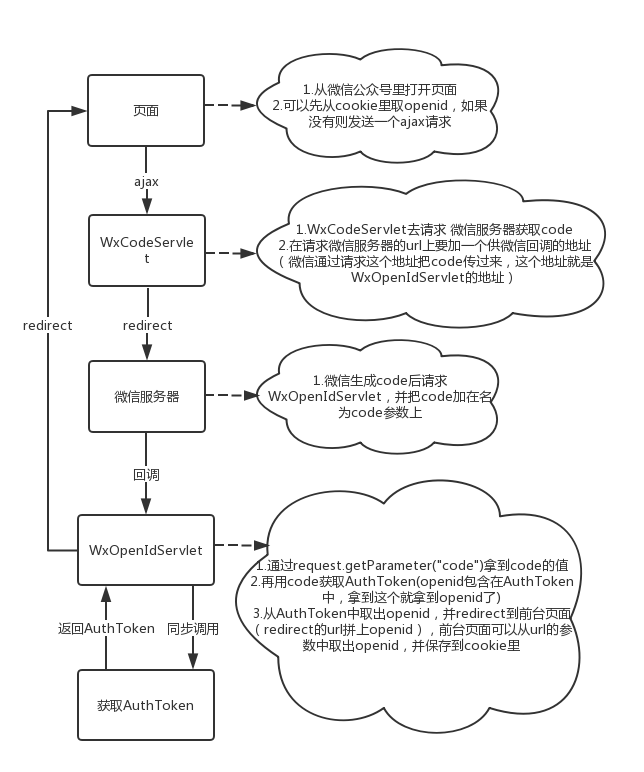
主要代码
页面js代码
/* 写cookie */
function setCookie(name, value) {
  var Days = 30;
  var exp = new Date();
  exp.setTime(exp.getTime() + Days * 24 * 60 * 60 * 1000);
  document.cookie = name + "=" + escape(value) + ";expires=" + exp.toGMTString() + ";path=/";
}
/* 读cookie */
function getCookie(name) {
  var arr = document.cookie.match(new RegExp("(^| )" + name + "=([^;]*)(;|$)"));
  if (arr != null) {
    return unescape(arr[2]);
  }
  return null;
}

/* 获取URL参数 */
function getUrlParams(name) {
  var reg = new RegExp("(^|&)" + name + "=([^&]*)(&|$)", "i");
  var r = window.location.search.substr(1).match(reg);
  if (r != null) {
    return unescape(r[2]);
  }
  return null;
}

/* 获取openid */
function getOpenId(url) {
  var openid = getCookie("usropenid");
  if (openid == null) {
    openid = getUrlParams('openid');
    alert("openid="+openid);
    if (openid == null) {
      window.location.href = "wxcode?url=" + url;
    } else {
      setCookie("usropenid", openid);
    }
  }
}
WxCodeServlet代码
//访问微信获取code
@Override
protected void doPost(HttpServletRequest req, HttpServletResponse resp)
    throws ServletException, IOException {
  String state = req.getParameter("url");
  //WxOpenIdServlet的地址
  String redirect ="http://"+Configure.SITE+"/wxopenid";
  redirect = URLEncoder.encode(redirect, "utf-8");
  StringBuffer url = new StringBuffer("https://open.weixin.qq.com/connect/oauth2/authorize?appid=")
      .append(Configure.APP_ID).append("&redirect_uri=").append(redirect)
      .append("&response_type=code&scope=snsapi_base&state=").append(state).append("#wechat_redirect");
  resp.sendRedirect(url.toString());
}
WxOpenIdServlet代码

短视频去水印微信小程序
下载
抖猫高清去水印微信小程序,源码为短视频去水印微信小程序全套源码,包含微信小程序端源码,服务端后台源码,支持某音、某手、某书、某站短视频平台去水印,提供全套的源码,实现功能包括:1、小程序登录授权、获取微信头像、获取微信用户2、首页包括:流量主已经对接、去水印连接解析、去水印操作指导、常见问题指引3、常用工具箱:包括视频镜头分割(可自定义时长分割)、智能分割(根据镜头自动分割)、视频混剪、模糊图片高
//访问微信获取openid
@Override
protected void doPost(HttpServletRequest req, HttpServletResponse resp)
    throws ServletException, IOException {
  String code = req.getParameter("code");
  String state = req.getParameter("state");
  Result ret = new Result();
  AuthToken token = WXUtil.getAuthToken(code);
  if(null != token.getOpenid()){
    ret.setCode(0);
    log.info("====openid=="+token.getOpenid());
    Map map = new HashMap();
    map.put("openid", token.getOpenid());
    map.put("state", state);
    ret.setData(map);
  }else{
    ret.setCode(-1);
    ret.setMsg("登录错误");
  }
  String redUrl = state+"?openid="+token.getOpenid();
  resp.sendRedirect(redUrl);
}
获取AuthToken(WXUtil.getAuthToken(code))代码
public static AuthToken getAuthToken(String code){
  AuthToken vo = null;
  try {
    String uri = "https://api.weixin.qq.com/sns/oauth2/access_token?";
    StringBuffer url = new StringBuffer(uri);
    url.append("appid=").append(Configure.APP_ID);
    url.append("&secret=").append(Configure.APP_SECRET);
    url.append("&code=").append(code);
    url.append("&grant_type=").append("authorization_code");
    HttpURLConnection conn = HttpClientUtil.CreatePostHttpConnection(url.toString());
    InputStream input = null;
    if (conn.getResponseCode() == 200) {
      input = conn.getInputStream();
    } else {
      input = conn.getErrorStream();
    }
    vo = JSON.parseObject(new String(HttpClientUtil.readInputStream(input),"utf-8"),AuthToken.class);
  } catch (Exception e) {
    log.error("getAuthToken error", e);
  }
  return vo;
}
HttpClientUtil类
package com.huatek.shebao.util;

import java.io.ByteArrayOutputStream;
import java.io.DataOutputStream;
import java.io.IOException;
import java.io.InputStream;
import java.net.HttpURLConnection;
import java.net.MalformedURLException;
import java.net.ProtocolException;
import java.net.URL;

public class HttpClientUtil {

  // 设置body体
  public static void setBodyParameter(String sb, HttpURLConnection conn)
      throws IOException {
    DataOutputStream out = new DataOutputStream(conn.getOutputStream());
    out.writeBytes(sb);
    out.flush();
    out.close();
  }

  // 添加签名header
  public static HttpURLConnection CreatePostHttpConnection(String uri) throws MalformedURLException,
      IOException, ProtocolException {
    URL url = new URL(uri);
    HttpURLConnection conn = (HttpURLConnection) url.openConnection();
    conn.setUseCaches(false);
    conn.setDoInput(true);
    conn.setDoOutput(true);
    conn.setRequestMethod("POST");
    conn.setInstanceFollowRedirects(true);
    conn.setConnectTimeout(30000);
    conn.setReadTimeout(30000);
    conn.setRequestProperty("Content-Type","application/json");
    conn.setRequestProperty("Accept-Charset", "utf-8");
    conn.setRequestProperty("contentType", "utf-8");
    return conn;
  }

  public static byte[] readInputStream(InputStream inStream) throws Exception {
    ByteArrayOutputStream outStream = new ByteArrayOutputStream();
    byte[] buffer = new byte[1024];
    int len = 0;
    while ((len = inStream.read(buffer)) != -1) {
      outStream.write(buffer, 0, len);
    }
    byte[] data = outStream.toByteArray();
    outStream.close();
    inStream.close();
    return data;
  }

}
封装AuthToken的VO类
package com.huatek.shebao.wxpay;

public class AuthToken {
  private String access_token;
  private Long expires_in;
  private String refresh_token;
  private String openid;
  private String scope;
  private String unionid;
  private Long errcode;
  private String errmsg;
  public String getAccess_token() {
    return access_token;
  }
  public void setAccess_token(String access_token) {
    this.access_token = access_token;
  }
  public Long getExpires_in() {
    return expires_in;
  }
  public void setExpires_in(Long expires_in) {
    this.expires_in = expires_in;
  }
  public String getRefresh_token() {
    return refresh_token;
  }
  public void setRefresh_token(String refresh_token) {
    this.refresh_token = refresh_token;
  }
  public String getOpenid() {
    return openid;
  }
  public void setOpenid(String openid) {
    this.openid = openid;
  }
  public String getScope() {
    return scope;
  }
  public void setScope(String scope) {
    this.scope = scope;
  }
  public String getUnionid() {
    return unionid;
  }
  public void setUnionid(String unionid) {
    this.unionid = unionid;
  }
  public Long getErrcode() {
    return errcode;
  }
  public void setErrcode(Long errcode) {
    this.errcode = errcode;
  }
  public String getErrmsg() {
    return errmsg;
  }
  public void setErrmsg(String errmsg) {
    this.errmsg = errmsg;
  }
}





