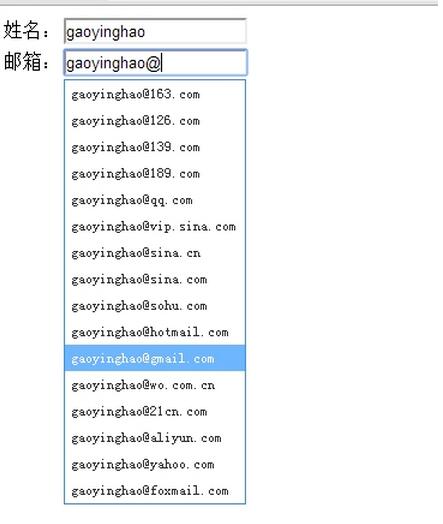
今天在公司做一个电子商务网站的注册会员时,要求用户在电子邮箱文本框中输入时,给与热点提示常用的电子邮箱,帮助用户选择,提高体验效果。下面是用jquery+css实现的邮箱自动补全,供大家参考和学习。
HTML代码:emailAutoComple.html
邮箱自动补全
GNCMS可视化拖拽公司网站模板1.0.0
下载
高端网络建设公司设计类网站模板 IT互联网移动建站类网站源码(带手机版数据同步)本套模板采用现在非常流行的全屏自适应布局设计,且栏目列表以简洁,非常时尚大气。后台支持可视拖拽编辑。 模板特点:1、手工书写DIV+CSS、代码精简无冗余。2、自适应结构,全球先进技术,高端视觉体验。3、SEO框架布局,栏目及文章页均可独立设置标题/关键词/描述。4、后台直接修改联系方式、传真、邮箱、地址等,修改更加方
JS代码:js/emailAutoComple.js(实现自动补全的关键代码)
立即学习“前端免费学习笔记(深入)”;
jQuery.AutoComplete = function(selector){
  var elt = $(selector);
  var strHtml = ''+
        '    '+
        '      '+
        '      '+
        '      '+
        '      '+
        '      '+
        '      '+
        '      '+
        '      '+
        '      '+
        '      '+
        '      '+
        '      '+
        '      '+
        '      '+
        '      '+
        '      '+
        '    '+
        '  ';
  //将div追加到body上
  $('body').append(strHtml);
  var autoComplete,autoLi;
  autoComplete = $('#AutoComplete');
  autoComplete.data('elt',elt);
  autoLi = autoComplete.find('li');
  autoLi.mouseover(function(){
    $(this).siblings().filter('.hover').removeClass('hover');
    $(this).addClass('hover');
  }).mouseout(function(){
    $(this).removeClass('hover');
  }).mousedown(function(){
    autoComplete.data('elt').val($(this).text()).change();
    autoComplete.hide();
  });
  //用户名补全+翻动
  elt.keyup(function(e){
    if(/13|38|40|116/.test(e.keyCode) || this.value==''){
      return false;
    }
    var username = this.value;
    if(username.indexOf('@')==-1){
      autoComplete.hide();
      return false;
    }
    autoLi.each(function(){
      this.innerHTML = username.replace(/\@+.*/,'')+$(this).attr('hz');
      if(this.innerHTML.indexOf(username)>=0){
        $(this).show();
      }else{
        $(this).hide();
      }
    }).filter('.hover').removeClass('hover');
    autoComplete.show().css({
      left : $(this).offset().left,
      top : $(this).offset().top + $(this).outerHeight(true) - 1,
      position: 'absolute',
      zIndex: '99999'
    });
    if(autoLi.filter(':visible').length==0){
      autoComplete.hide();
    }else{
      autoLi.filter(':visible').eq(0).addClass('hover');
    }
  }).keydown(function(e){
    if(e.keyCode==38){ //上
      autoLi.filter('.hover').prev().not('.AutoComplete_title').addClass('hover').next().removeClass('hover');
    }else if(e.keyCode==40){ //下
      autoLi.filter('.hover').next().addClass('hover').prev().removeClass('hover');
    }else if(e.keyCode==13){ //确定
      autoLi.filter('.hover').mousedown();
    }
  }).focus(function(){
    autoComplete.data('elt',$(this));
  }).blur(function(){
    autoComplete.hide();
  });
};
CSS代码:css/emailAutoComple.css
#AutoComplete{background:#fff;border:1px solid #4190db;display:none;width:150px;}
#AutoComplete ul{list-style-type:none;margin:0;padding:0;}
#AutoComplete li{color:#333;cursor:pointer;font:12px/22px \5b8b\4f53;text-indent:5px;}
#AutoComplete .hover{background:#6eb6fe;color:#fff;}
效果图: