



本文实例讲述了jquery实现鼠标跟随提示层效果代码。分享给大家供大家参考,具体如下:
运行效果截图如下:
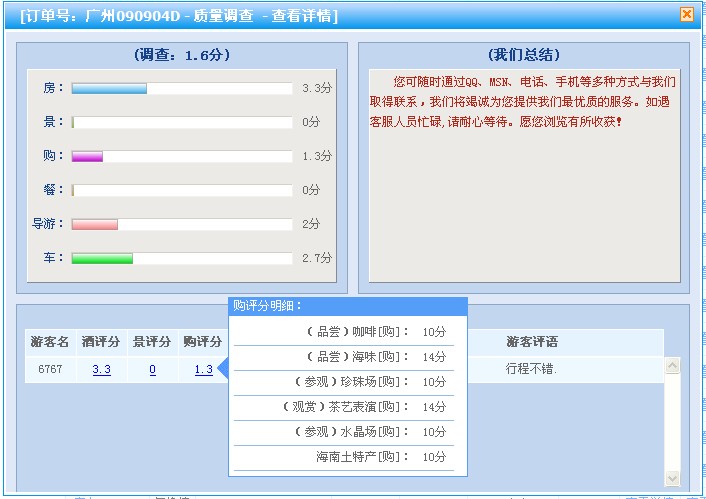
Web网站有不少需要用到tip提示层的地方,结合jquery的jquery.cluetip.js ,可以实现本地字符或ajax异步调用显示提示层。如以上购评分明细提示。(优势:宽度需要调用页加载时定义,高度auto , 且三角指定图标能根据显示层的大小位置来调用它的位置,达到醒目直观的效果)
jquery.cluetip.css

立即学习“前端免费学习笔记(深入)”;
/* global */
#cluetip-close img {
 border: 0;
}
#cluetip-title {
 overflow: hidden;
}
#cluetip-title #cluetip-close {
 float: right;
 position: relative;
}
#cluetip-waitimage {
 width: 43px;
 height: 11px;
 position: absolute;
 background-image: url(../img_new/cluetipwait.gif);
}
.cluetip-arrows {
 display: none;
 position: absolute;
 top: 0;
 left: -11px;
 height: 22px;
 width: 11px;
 background-repeat: no-repeat;
 background-position: 0 0;
}
#cluetip-extra {
 display: none;
}
/***************************************
  =cluetipClass: 'default'
-------------------------------------- */
.cluetip-default {
 background-color: #d9d9c2;
}
.cluetip-default #cluetip-outer {
 position: relative;
 margin: 0;
 background-color: #d9d9c2;
}
.cluetip-default h3#cluetip-title {
 margin: 0 0 5px;
 padding: 8px 10px 4px;
 font-size: 14px;
 font-weight: normal;
 background-color: #87876a;
 color: #fff;
}
.cluetip-default #cluetip-title a {
 color: #d9d9c2;
 font-size: 0.95em;
}
.cluetip-default #cluetip-inner {
 padding: 10px;
}
.cluetip-default div#cluetip-close {
 text-align: right;
 margin: 0 5px 5px;
 color: #900;
}
/* default arrows */
.clue-right-default .cluetip-arrows {
 background-image: url(../img_new/cluetipdarrowleft.gif);
}
.clue-left-default .cluetip-arrows {
 background-image: url(../img_new/cluetipdarrowright.gif);
 left: 100%;
 margin-right: -11px;
}
.clue-top-default .cluetip-arrows {
 background-image: url(../img_new/cluetipdarrowdown.gif);
 top: 100%;
 left: 50%;
 margin-left: -11px;
 height: 11px;
 width: 22px;
}
.clue-bottom-default .cluetip-arrows {
 background-image: url(../img_new/cluetipdarrowup.gif);
 top: -11px;
 left: 50%;
 margin-left: -11px;
 height: 11px;
 width: 22px;
}
/***************************************
  =cluetipClass: 'jtip'
-------------------------------------- */
.cluetip-jtip {
 background-color: transparent;
  display:none;
}
.cluetip-jtip #cluetip-outer {
 border: 1px solid #559EF8;
 position: relative;
 background-color: #fff;
}
.cluetip-jtip h3#cluetip-title {
 margin: 0 0 5px;
 padding: 2px 5px;
 font-size: 12px;
 font-weight: normal;
 background-color: #559EF8;
 color: #fff;
}
.cluetip-jtip #cluetip-inner {
 padding: 0 5px 5px;
 display: inline-block;
}
.cluetip-jtip div#cluetip-close {
 text-align: right;
 margin: 0 5px 5px;
 color: #900;
 display:none;
}
/* jtip arrows */
.clue-right-jtip .cluetip-arrows {
 background-image: url(../img_new/cluetiparrowleft.gif);
}
.clue-left-jtip .cluetip-arrows {
 background-image: url(../img_new/cluetiparrowright.gif);
 left: 100%;
 margin-right: -11px;
}
.clue-top-jtip .cluetip-arrows {
 background-image: url(../img_new/cluetiparrowdown.gif);
 top: 100%;
 left: 50%;
 margin-left: -11px;
 height: 11px;
 width: 22px;
}
.clue-bottom-jtip .cluetip-arrows {
 background-image: url(../img_new/cluetiparrowup.gif);
 top: -11px;
 left: 50%;
 margin-left: -11px;
 height: 11px;
 width: 22px;
}
/***************************************
  =cluetipClass: 'rounded'
-------------------------------------- */
.cluetip-rounded {
 background: transparent url(../img_new/cluetipbl.gif) no-repeat 0 100%;
 margin-top: 10px;
 margin-left: 12px;
}
.cluetip-rounded #cluetip-outer {
 background: transparent url(../img_new/cluetiptl.gif) no-repeat 0 0;
 margin-top: -12px;
}
.cluetip-rounded #cluetip-title {
 background-color: transparent;
 padding: 12px 12px 0;
 margin: 0 -12px 0 0;
 position: relative;
}
.cluetip-rounded #cluetip-extra {
 position: absolute;
 display: block;
 background: transparent url(../img_new/cluetiptr.gif) no-repeat 100% 0;
 top: 0;
 right: 0;
 width: 12px;
 height: 30px;
 margin: -12px -12px 0 0;
}
.cluetip-rounded #cluetip-inner {
 background: url(../img_new/cluetipbr.gif) no-repeat 100% 100%;
 padding: 5px 12px 12px;
 margin: -18px -12px 0 0;
 position: relative;
}
.cluetip-rounded div#cluetip-close {
 text-align: right;
 margin: 0 5px 5px;
 color: #009;
 background: transparent;
}
.cluetip-rounded div#cluetip-close a {
 color: #777;
}
/* rounded arrows */
.clue-right-rounded .cluetip-arrows {
 background-image: url(../img_new/cluetiprarrowleft.gif);
}
.clue-left-rounded .cluetip-arrows {
 background-image: url(../img_new/cluetiprarrowright.gif);
 left: 100%;
 margin-left: 12px;
}
.clue-top-rounded .cluetip-arrows {
 background-image: url(../img_new/cluetiprarrowdown.gif);
 top: 100%;
 left: 50%;
 margin-left: -11px;
 height: 11px;
 width: 22px;
}
.clue-bottom-rounded .cluetip-arrows {
 background-image: url(../img_new/cluetiprarrowup.gif);
 top: -23px;
 left: 50%;
 margin-left: -11px;
 height: 11px;
 width: 22px;
}
/* stupid IE6 HasLayout hack */
.cluetip-rounded #cluetip-title,
.cluetip-rounded #cluetip-inner {
 zoom: 1;
}
.float-left {
 float: left;
 margin-right: .5em;
 display: inline;
 position: relative;
}
.float-right {
 float: right;
 margin-left: .5em;
 display: inline;
 position: relative;
}
jquery-1.3.2.min.js -- 官方网可下载,这里不再表述。(必须)
jquerycluetipLoad.js --提示层的基本参数和属性的定义。
/* Jquery 鼠标跟随提示层。 * 创建人:fooo * 创建日期:09-09-23 * 修改人: * 修改日期: * 本地字符提示示例:我们的 * Ajax异步调用文件且提示示例: * * 改变提示层宽度大小,只需在调用页加入: $.fn.cluetip.defaults.width = '100'; -根据大小调整。 */ // $.fn.cluetip.defaults.tracking = true; // $.fn.cluetip.defaults.width = 'auto'; $(document).ready(function() { //default theme $('a.title').cluetip({splitTitle: '|'}); $('a.basic').cluetip(); $('a.custom-width').cluetip({width: '200px', showTitle: false}); $('h4').cluetip({attribute: 'id', hoverClass: 'highlight'}); $('#sticky').cluetip({sticky: true, closePosition: 'title', arrows: true }); $('#examples a:eq(5)').cluetip({ hoverClass: 'highlight', sticky: true, closePosition: 'bottom', closeText: '@@##@@', truncate: 60 }); $('a.load-local').cluetip({local:true, hideLocal: true, sticky: true, arrows: true, cursor: 'pointer'}); $('#clickme').cluetip({activation: 'click', sticky: true, width: 250}); $('ol:first a:last').cluetip({tracking: true}); //jTip theme $('a.jt:eq(0)').cluetip({ cluetipClass: 'jtip', arrows: true, dropShadow: false, sticky: true, mouseOutClose: true, closePosition: 'title', closeText: '@@##@@' }); $('a.jt:eq(1)').cluetip({cluetipClass: 'jtip', arrows: true, dropShadow: false, hoverIntent: false}); $('span[title]').css({borderBottom: '0px solid #900'}).cluetip({splitTitle: '|', arrows: true, dropShadow: false, cluetipClass: 'jtip'}); $('a.jt:eq(2)').cluetip({ cluetipClass: 'jtip', arrows: true, dropShadow: false, height: '150px', sticky: true, positionBy: 'bottomTop' }); $('a.jt:eq(3)').cluetip({local: true, hideLocal: false}); $('a.jt:eq(4)').cluetip({ cluetipClass: 'jtip', arrows: true, dropShadow: false, onActivate: function(e) { var cb = $('#cb')[0]; return !cb || cb.checked; } }); // Rounded Corner theme $('ol.rounded a:eq(0)').cluetip({splitTitle: '|', dropShadow: false, cluetipClass: 'rounded', showtitle: false}); $('ol.rounded a:eq(1)').cluetip({cluetipClass: 'rounded', dropShadow: false, showtitle: false, positionBy: 'mouse'}); $('ol.rounded a:eq(2)').cluetip({cluetipClass: 'rounded', dropShadow: false, showtitle: false, positionBy: 'bottomTop', topOffset: 70}); $('ol.rounded a:eq(3)').cluetip({cluetipClass: 'rounded', dropShadow: false, sticky: true, ajaxCache: false, arrows: true}); $('ol.rounded a:eq(4)').cluetip({cluetipClass: 'rounded', dropShadow: false}); });
更多关于jQuery相关内容感兴趣的读者可查看本站专题:《jQuery日期与时间操作技巧总结》、《jQuery切换特效与技巧总结》、《jQuery拖拽特效与技巧总结》、《jQuery扩展技巧总结》、《jQuery常见经典特效汇总》、《jQuery动画与特效用法总结》、《jquery选择器用法总结》及《jQuery常用插件及用法总结》
希望本文所述对大家jQuery程序设计有所帮助。




