



这周的学习内容承接上周的文章!
在上次文章的结尾,我们提到了使用Statement接口时可能会面临SQL注入的风险,不建议大家使用。为了解决SQL注入问题,我们转而使用PreparedStatement接口(详细内容请参阅上一篇文章:第27次文章:简单了解JDBC)。
下面我们直接提供测试代码:
import com.mysql.jdbc.Connection;
/**
 * 测试PreparedStatement的基本用法
 */
public class Demo03 {
  public static void main(String[] args) {
    Connection conn = null;
    PreparedStatement ps = null;
    try {
      //加载驱动类
      Class.forName("com.mysql.jdbc.Driver");
      conn = (Connection) DriverManager.getConnection("jdbc:mysql://localhost:3306/testjdbc", "root", "123456");
  String sql = "insert into t_user1 (username,pwd,regTime) value (?,?,?)";
  ps = conn.prepareStatement(sql);
  //      ps.setString(1, "peng");
  //      ps.setString(2, "123456");
  //      ps.setDate(3, new java.sql.Date(System.currentTimeMillis()));//获取当前时间
  System.out.println("插入一条语句");

  ps.setObject(1, "peng");
  ps.setObject(2, "123456");
  ps.setObject(3, new java.sql.Date(System.currentTimeMillis()));//获取当前时间
} catch (ClassNotFoundException e) {
  e.printStackTrace();
} catch (SQLException e) {
  e.printStackTrace();
} finally {
  try {
    if(conn != null) {
      conn.close();
    }
  } catch (SQLException e) {
    e.printStackTrace();
  }
  try {
    if(ps != null) {
      ps.close();
    }
  } catch (SQLException e) {
    e.printStackTrace();
  }
}}
}
注意事项:

当我们从Statement接口转向PreparedStatement接口后,参数不再通过拼接字符串的方式传递,而是在SQL命令中使用“?”作为占位符。这正是PreparedStatement防止SQL注入的关键所在。如我们在注释掉的代码段中所示,使用PreparedStatement对象ps的setString、setDate等方法向每个占位符传递参数。这样可以预先判断参数是否符合String、int等类型,从而避免了向SQL语句中注入恶意指令的情况。
在向SQL语句中输入参数时,我们不仅可以使用setXXX方法,还可以直接使用setObject()方法传递参数,此时无需考虑不同参数类型的区别,全部作为Object类型传递。
使用setDate()方法时,需要使用数据库中的时间类型java.sql.Date,注意这与Java中的Date类型不同。

(5)Result接口
Statement执行SQL语句返回Result结果集。
Result提供了检索不同类型字段的方法,常用的包括:
getString():获取数据库中类型为varchar、char等的对象 getFloat():获取数据库中类型为Float的对象 getDate():获取数据库中类型为Date的对象 getBoolean():获取数据库中类型为Boolean的对象
测试Result接口:
import com.mysql.jdbc.Connection;
/**
测试ResultSet结果集的基本用法 */ public class Demo04 { public static void main(String[] args) { Connection conn = null; PreparedStatement ps = null; ResultSet rs = null; try { //加载驱动类 Class.forName("com.mysql.jdbc.Driver"); conn = (Connection) DriverManager.getConnection("jdbc:mysql://localhost:3306/testjdbc", "root", "123456"); String sql = "select id,username,pwd from t_user where id>?"; ps = conn.prepareStatement(sql); ps.setObject(1, 1);//取出所有id大于等于2的记录 rs = ps.executeQuery(); while(rs.next()) { System.out.println(rs.getInt(1)+"---"+rs.getString(2)+"---"+rs.getInt(3));//一次取出第1列,第2列,第3列 } } catch (ClassNotFoundException e) { e.printStackTrace(); } catch (SQLException e) { e.printStackTrace(); } finally { try { if(conn != null) { conn.close(); } } catch (SQLException e) { e.printStackTrace(); } try { if(ps != null) { ps.close(); } } catch (SQLException e) { e.printStackTrace(); } try { if(rs != null) { rs.close(); } } catch (SQLException e) { e.printStackTrace(); } } } }
注意事项:
在此代码中,我们仍然使用PreparedStatement类型来传递参数,使用“?”作为占位符,向占位符中传递我们需要大于的参数值。
使用Result接口时,可以将其视为一个容器,用于接收返回的id大于2的结果。然后通过编写一个while循环来输出结果集中的内容。其中,rs.next()方法类似于迭代器中的hasNext()方法。
(6)依序关闭使用的对象及连接
Result——>Statement——>Connection
(7)批处理
Batch
对于大量的批处理操作,建议使用Statement,因为PreparedStatement的预编译空间有限,当数据量特别大时,可能会发生异常。
测试批处理操作:
import com.mysql.jdbc.Connection;
/**
测试批处理的基本用法 */ public class Demo05 { public static void main(String[] args) { Connection conn = null; Statement stmt = null; ResultSet rs = null; try { //加载驱动类 Class.forName("com.mysql.jdbc.Driver"); conn = (Connection) DriverManager.getConnection("jdbc:mysql://localhost:3306/testjdbc", "root", "123456"); conn.setAutoCommit(false); //设为手动提交 long start = System.currentTimeMillis(); stmt = conn.createStatement();
for (int i=0;i<100000;i++) { stmt.addBatch("insert into t_user1 (username,pwd,regTime) values ('user"+i+"','pwd"+i+"',now())"); } stmt.executeBatch(); conn.commit(); long end = System.currentTimeMillis(); System.out.println("批处理执行时间:"+(end-start)+"ms"); } catch (ClassNotFoundException e) { e.printStackTrace(); } catch (SQLException e) { e.printStackTrace(); } finally { try { if(conn != null) { conn.close(); } } catch (SQLException e) { e.printStackTrace(); } try { if(stmt != null) { stmt.close(); } } catch (SQLException e) { e.printStackTrace(); } } } }
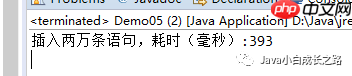
注意事项:
在进行批处理时,需要注意两点:第一,将PreparedStatement接口替换为Statement接口;第二,将连接的事务提交设为手动提交。




