
1,下载安装包
安装包地址
2,在php.ini文件中进行如下配置:
;zend_extension="D:\phpStudy\PHPTutorial\php\php-7.2.1-nts\php_xdebug-2.6.0-7.2-vc15-nts-x86_64.dll"
zend_extension="D:\phpStudy\PHPTutorial\php\php-7.2.1-nts\php_xdebug-2.6.0-7.2-vc15-nts.dll"
xdebug.profiler_output_dir="D:\phpStudy\PHPTutorial\tmp\xdebug"
xdebug.trace_output_dir="D:\phpStudy\PHPTutorial\tmp\xdebug"
xdebug.profiler_append = 0
xdebug.profiler_enable = 1
xdebug.profiler_enable_trigger = 0
xdebug.profiler_output_name = "cache.out.%t-%s"
xdebug.remote_enable = 1
xdebug.remote_handler = "dbgp"
xdebug.remote_autostart = 1
xdebug.remote_host = "127.0.0.1"
xdebug.remote_port = 9060
xdebug.idekey = phpstorm
3,配置PhpStorm

一个经过完善设计的经典网上购物系统,适用于各种服务器环境的高效网上购物系统解决方案,shopxp购物系统Html版是我们首次推出的免费购物系统源码,完整可用。我们的系统是免费的不需要购买,该系统经过全面测试完整可用,如果碰到问题,先检查一下本地的配置或到官方网站提交问题求助。 网站管理地址:http://你的网址/admin/login.asp 用户名:admin 密 码:admin 提示:如果您
 0
0

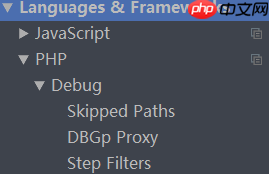

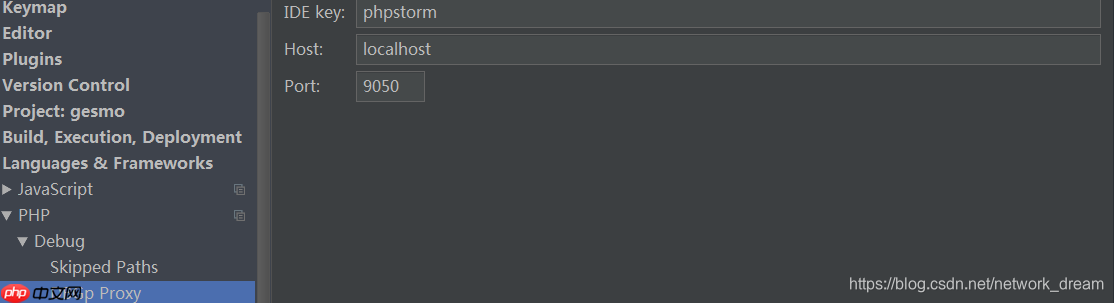
4,如果使用PhpStudy,请确保勾选xdebug选项

Windows激活工具是正版认证的激活工具,永久激活,一键解决windows许可证即将过期。可激活win7系统、win8.1系统、win10系统、win11系统。下载后先看完视频激活教程,再进行操作,100%激活成功。

Copyright 2014-2025 https://www.php.cn/ All Rights Reserved | php.cn | 湘ICP备2023035733号


 522
522









 收藏
收藏













