



宝塔面板mysql数据库路径一键修改脚本,助您轻松更改默认数据目录!此shell脚本专为宝塔linux面板用户设计,希望能帮到您。如有任何问题,欢迎留言! 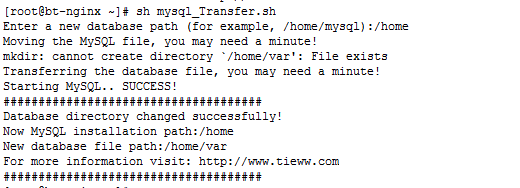
脚本主要功能:
-
修改数据库路径: 执行
sh mysql_Transfer.sh即可将数据库文件移动到新的路径。 -
还原默认路径: 执行
sh mysql_Transfer.sh old即可将数据库文件移回原先的默认路径。
脚本提示信息(中英文对照):
-
找不到
/www/server/data目录! / Sorry, I can’t find the /www/server/data directory! -
找不到
/www/server/mysql目录! / Sorry, I can’t find the /www/server/mysql directory! -
输入新的数据库路径(例如:
/home/mysql): / Enter a new database path (for example, /home/mysql): - 新的数据库路径不能为空! / New database path cannot be empty!
- 数据库目录更改不成功! / Database directory changes not successful!
- 数据库目录更改成功! / Database directory changed successfully!
- 正在转移MySQL文件,可能需要一分钟! / Moving the MySQL file, you may need a minute!
- 正在转移数据库文件,可能需要一分钟! / Transferring the database file, you may need a minute!
- 新的MySQL安装路径: / Now MySQL installation path:
- 恢复成功! / Recover successfully!
- 恢复失败! / Recovery failure!
- 新的数据库文件路径: / New database file path:
下载及使用方法:

请使用以下命令下载并运行脚本(仅限宝塔面板2.X版本):
wget http://www.tieww.com/soft/mysql_Transfer.sh && sh mysql_Transfer.sh
请注意,运行脚本前请务必备份您的数据库!




